User calls
Find more information about open calls and the application process.
is an advanced platform developed to enhance the management of user proposal submissions. It enables users to efficiently track the status of their proposals and engage with the system for any required follow-up actions..
You can access the UOS platform and start creating your proposal by visiting uos.eli-laser.eu.
If you already have an ELI user account: Simply enter your user name (or email address) and password to log in at uos.eli-laser.eu.
If you forgot your user name or password: Enter your email address and ask for new credentials. Please, avoid creating new account, send email to uos-request[@]eli-laser.eu.
If you don't have an account, please register here.
To create a new proposal on your UOS dashboard, click on 'New Proposal' and select the active User Call. Complete the proposal template and submit it when you are ready. You have the option to save and edit the form at any time before the deadline. Please keep in mind that during your first access to the form, you must enter at least one character in all required fields (indicated by an asterisk) in order to navigate between sections and accept the terms and conditions.
Important Information:
All proposers are required to be invited and added to the proposal using a valid ELI user account.
Invited co-proposers must register for an ELI account and log in to the User Office System (UOS) at least once to gain access to the proposal.
Co-editing of the proposal is permitted, thereby enabling collaborators to work together effectively and enhance the overall quality of the submission.
We strongly recommend consulting with the instrument scientists before submitting your proposal!
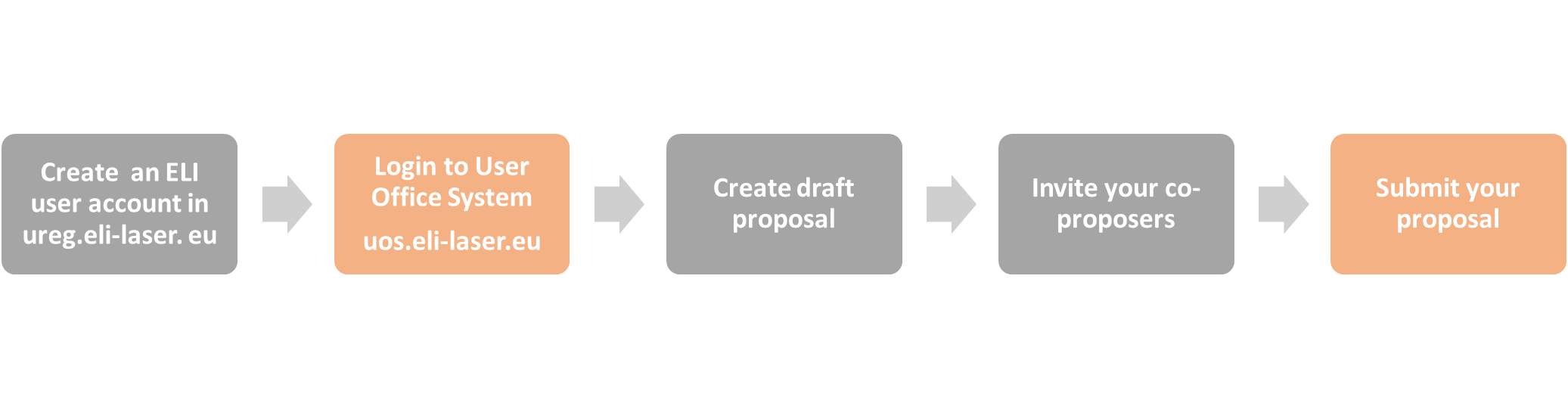
We have streamlined the process for you to commence using the User Office System. To support you at every stage, the user manual is accessible here.
Should you have any inquiries or require further assistance, please do not hesitate to contact the User Office. Additionally, if needed, we can arrange a 30-minute online meeting to provide you with further support.
Quick guide: How to add a co-proposer?
Quick guide: I am invited to be a co-proposer?
UREG is a platform developed to efficiently manage user registration and accounts. By registering, users obtain access to a variety of services, including:
Submitting proposals for experiments in UOS
Getting access to other services at ELI ERIC, like on-line trainings
Managing personal details like contact information etc.
Once registered, users can log in at any time to update their profiles.
Please refrain from creating a new profile if you already have an ELI user account with UOS.
You can access the ELI User Registry platform and start your registration by visiting this link.
Practical information on travel and accommodation, visa procedures, and other requirements for access to the individual ELI Facilities can be found here:
Find more information about open calls and the application process.